Quick answer
A tone generator plays a pure sine wave at the frequency you choose. Sweep slowly from low to high to hear where a speaker rattles, buzzes or goes quiet — a fast way to check a phone speaker after water exposure. You can also dial in a low tone (≈165 Hz) to help push water out.
Music hides problems; a single clean tone exposes them. That's why audio technicians use tone generators — and why it's one of the best tools for checking whether your iPhone speaker is fully clear after water eject.
On this page 5 sections
How to test a speaker with a tone generator
- Set volume to 50–70%. Loud enough to hear defects, not so loud that everything distorts.
- Start low. Begin around 100–200 Hz. Small phone speakers roll off in the deep bass, so very low tones will sound faint — that's normal.
- Sweep slowly upward. Move through the midrange (500–4,000 Hz) where voices live. Listen for buzzing or rattling.
- Check the highs. Continue up to 10,000 Hz+ at low volume. Missing highs can mean water or dust on the mesh.
- Note problem frequencies. A rattle at one pitch suggests debris; buzzing everywhere suggests damage.
Use the Tone Generator in Clear Wave
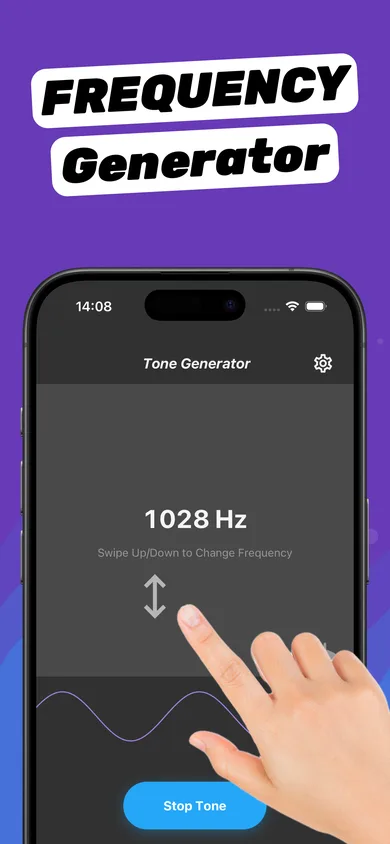
- Open Tone Generator. The current frequency shows in the middle of the screen (e.g. 1028 Hz).
- Swipe up or down. Swipe to raise or lower the frequency and sweep the range.
- Stop Tone when done. If you hear rattling, run a Water Eject session and sweep again.
Useful test frequencies
| Frequency | Use |
|---|---|
| ~165 Hz | Water eject tone for phone speakers |
| 440 Hz | Tuning reference (A4) |
| 1,000 Hz | Standard audio test tone |
| 2,000–4,000 Hz | Speech clarity range — muffled sound shows up here |
| 10,000 Hz+ | High-frequency check; hearing sensitivity fades with age |
Protect your hearing
Pure tones sound louder and more fatiguing than music. Keep volume moderate, don't hold the speaker to your ear, and take breaks.
Questions
What is a tone generator used for?
Testing speakers and headphones, finding rattles, checking hearing range, tuning instruments, and playing low tones to help eject water from phone speakers.
Can my iPhone play very low frequencies?
It can play them, but small phone speakers reproduce deep bass poorly, so tones below roughly 150 Hz sound faint.
Is the tone generator in Clear Wave free?
Clear Wave is free to download. Some advanced tools are part of the optional subscription, which includes a free trial.