Quick answer
A decibel (dB) meter app uses the iPhone microphone to estimate how loud a sound is. Use it to compare your speaker before and after cleaning, check room noise, or stay under the ~85 dB level where long exposure can harm hearing. Phone meters are approximate — great for comparisons, not certified measurements.
A dB meter turns "it sounds quieter" into a number. That's useful after water or dust cleaning, when you want proof the speaker is back to normal — and handy for everyday questions like "how loud is this bar?" or "is my kid's tablet too loud?".
On this page 5 sections
How to measure speaker loudness with a dB meter
- Pick a reference sound. The same song or test tone at the same volume every time.
- Fix the distance. Hold a second device with the meter at the same distance (e.g. 30 cm) from the speaker, or measure the room with the phone itself.
- Measure in a quiet room. Background noise skews readings.
- Record the average. Watch the reading for 10–15 seconds and note the typical value.
- Compare before vs. after. After cleaning, measure again with identical settings.
Use the dB Meter in Clear Wave
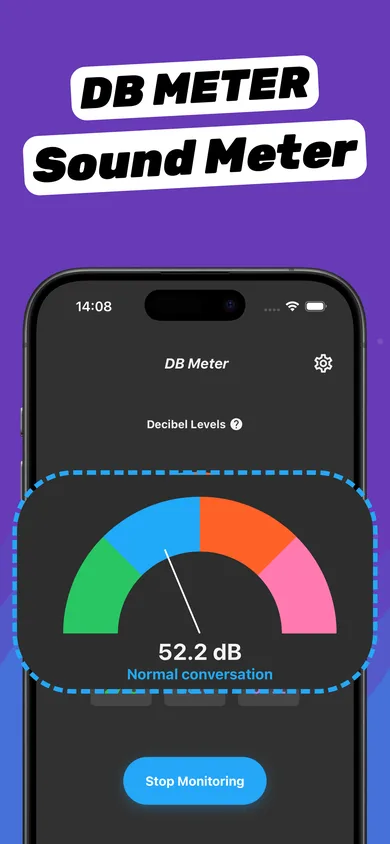
- Open DB Meter. Allow microphone access when asked — the meter needs it to listen.
- Start monitoring. The gauge shows the current level in dB with a plain-language label such as "Normal conversation".
- Stop monitoring. Tap Stop Monitoring when done. Readings are processed on your device.
Common sound levels
| Sound | Approx. level |
|---|---|
| Quiet room / whisper | 30 dB |
| Normal conversation | 50–60 dB |
| Busy street, vacuum cleaner | 70–80 dB |
| Level where long exposure risks hearing (8 h) | 85 dB |
| Concert, club | 100–110 dB |
Every +10 dB sounds roughly twice as loud.
How accurate is an iPhone dB meter?
iPhone microphones are good but not laboratory-calibrated, and they're tuned for voice. Expect readings within a few dB for everyday sounds — ideal for before/after comparisons with the same phone. For legal or workplace compliance, use a certified sound level meter.
Questions
Can an iPhone measure decibels?
Yes, with a dB meter app using the microphone. Apple Watch and the Health app also track environmental noise levels.
What is a safe decibel level?
Sustained exposure above about 85 dB for hours can damage hearing. Short exposure to louder sounds is less risky.
Does the dB meter record audio?
Clear Wave's meter listens to measure loudness on your device. App Store privacy details list no data linked to your identity.