
Quick answer
A left/right (stereo) test plays sound through one channel at a time so you can hear if either speaker is quiet, muffled or silent. On iPhone the earpiece and bottom speaker are the two channels. If one side sounds worse after getting wet, run a water eject session on that speaker and test again.
With both speakers playing, a problem on one side is easy to miss. Splitting the channels makes it obvious — and tells you exactly which speaker to clean, dry or repair. It works for headphones, AirPods and Bluetooth speakers too.
On this page 5 sections
How to run a left/right speaker test
- Turn off Mono Audio. Settings → Accessibility → Audio & Visual → Mono Audio must be off, or both channels play the same sound.
- Check the balance slider. In the same menu, make sure Balance is centered between L and R.
- Play the left channel only. Use a stereo test that plays sound in one channel. Listen: which speaker plays, and does it sound clean?
- Play the right channel only. Compare loudness and clarity with the left.
- Fix the weaker side. Muffled = water or dust (clean it). Silent or crackling = possible hardware issue.
Stereo test in Clear Wave
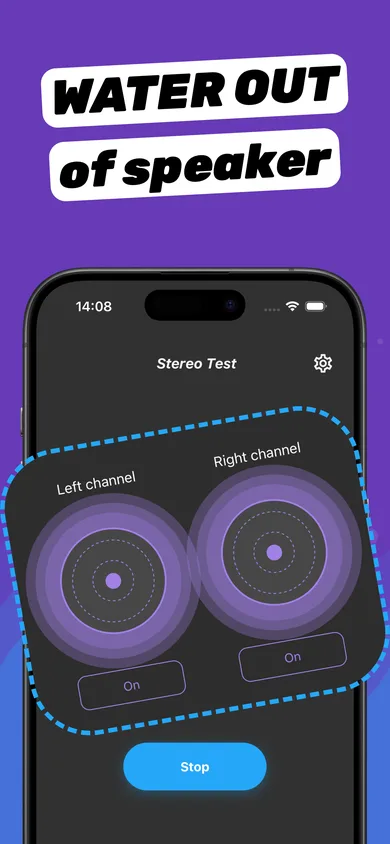
- Open Stereo Test. You'll see a Left channel and a Right channel control.
- Tap On for Left. Listen for the sound on the left side only.
- Tap On for Right. Compare with the left side.
- Clean the weak side. Run a Water Eject session with that speaker facing down, then test again.
Which iPhone speaker is left and which is right?
In portrait, iOS routes stereo between the bottom speaker and the top earpiece. When you rotate to landscape, iOS flips the channels so left and right match the direction you're holding the phone. Test in the orientation you usually watch videos in.
Testing AirPods and headphones
Connect your headphones and run the same test. If one AirPod is quieter, clean its mesh gently with a dry soft brush and check Balance in Accessibility settings. Water in sealed earbuds may need time to dry — see Does water eject work on AirPods?
Questions
Why does my iPhone play sound from only one speaker?
Check that Mono Audio is off and Balance is centered. Then run a stereo test; if one side is muffled, it may have water or dust in it.
Can I test AirPods left and right?
Yes. Connect them and run a stereo test — each earbud should play only its own channel.
Why is my earpiece quieter than the bottom speaker?
It's smaller and tuned for calls, so it's slightly quieter by design. A big difference, or muffled sound, points to lint or water in the earpiece grille.